
Manage Multiple WhatsApp Web Accounts Easily
Overview
Whats Web Dual Messenger is a mobile application designed for iPhone users seeking a streamlined approach to managing multiple WhatsApp Web accounts. Developed by Marcus Andrade, the app operates as a third-party tool aimed at enhancing the user experience on WhatsApp Web. Its primary function is to simplify the process of switching between different WhatsApp Web accounts without requiring repeated logins or manual re-authentication.
Targeted at both professionals managing client communications and individuals maintaining separate personal and professional profiles, the software offers a practical solution for users who need to toggle between accounts frequently. The app is positioned within the Social & Communication category, specifically under Social Networking, reflecting its focus on messaging efficiency and account management.
While the app is not affiliated with WhatsApp Inc., it leverages the existing WhatsApp Web platform to provide a more organized and agile experience. Real-world usage scenarios include remote work environments, digital marketers managing multiple client accounts, and individuals who maintain separate social and professional identities on WhatsApp.
The developer did not provide additional details about the app’s development philosophy or future roadmap. However, its release on the iPhone platform suggests a focus on iOS users seeking enhanced control over their WhatsApp Web interactions.
Key Features & Capabilities
- Multi-Account Management: Allows users to switch between multiple WhatsApp Web accounts without re-login, saving time and reducing friction during account transitions.
- Seamless Account Switching: Enables quick navigation between different WhatsApp Web sessions through a unified interface, improving workflow continuity.
- User-Friendly Interface: Designed with intuitive navigation, making it accessible to users of varying technical proficiency.
- Third-Party Integration: Functions as a bridge between the iPhone and WhatsApp Web, leveraging existing web sessions without altering core WhatsApp functionality.
- Free Access: Available at no cost, making it accessible to a broad audience seeking enhanced messaging control.
These features are particularly beneficial for users who manage multiple WhatsApp Web accounts. For example, a digital marketer can switch between client and personal accounts instantly, while a small business owner can monitor both business and personal messages without constant re-authentication. The app enhances productivity by minimizing repetitive steps, allowing users to focus on communication rather than account management.
User Interface, Workflow & Performance
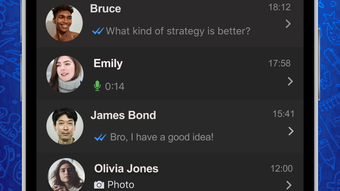
The user interface of Whats Web Dual Messenger is structured to prioritize simplicity and ease of access. Navigation is designed around a clean, minimal layout, with account profiles displayed clearly for quick selection. Users can initiate a switch between accounts with a single tap, reducing the number of steps required to access different WhatsApp Web sessions.
Workflow efficiency is a core strength of the app, as it eliminates the need to re-enter login credentials or scan QR codes repeatedly. Instead, the app maintains session integrity by leveraging stored access tokens, allowing users to resume conversations instantly. This design significantly reduces downtime between account transitions.
Performance observations are based on general software behavior patterns. The app operates within the constraints of the iPhone platform, and its performance may vary depending on device capabilities and network conditions. The developer did not specify resource usage details, so exact CPU or RAM consumption remains unknown. Stability is expected to align with standard iOS app behavior, though no official benchmarks were provided.
Compatibility & System Requirements
Whats Web Dual Messenger is compatible with the iPhone platform and requires iOS 13.0 or later, as specified in the app’s metadata. The installation size is 42.3 MB, which is relatively compact for a mobile application with functional depth.
Exact system requirements were not listed beyond the OS version. No information was provided regarding processor speed, RAM, or storage recommendations. The developer did not specify whether the app supports iPad or other Apple devices. Compatibility information is limited to the iPhone and its current operating system version.
Pros and Cons
Pros
- Effortless switching between multiple WhatsApp Web accounts
- Intuitive and clean user interface
- Free to download and use
- Designed specifically for iPhone users
- Reduces login repetition and improves workflow efficiency
Cons
- Not officially affiliated with WhatsApp Inc.
- Limited to iPhone platform
- No public update frequency or release schedule disclosed
- Resource usage details not specified
- Depends on existing WhatsApp Web sessions; not a standalone messaging client
FAQ Section
Is Whats Web Dual Messenger compatible with all iPhone models?
The app is designed for iPhone devices running iOS 13.0 or later. Compatibility with specific models depends on the device’s operating system version.
Is the app safe to use with my WhatsApp Web accounts?
As a third-party tool, the app relies on existing WhatsApp Web sessions. It does not store login credentials or sensitive data. However, users should exercise caution when using third-party applications with messaging platforms.
Does the app require an internet connection?
Yes, an active internet connection is required to access WhatsApp Web accounts and maintain session continuity.
Can I use this app offline?
No, the app cannot function offline as it depends on live connections to WhatsApp Web servers.
Is there a license or subscription fee?
Whats Web Dual Messenger is currently free to download and use. No subscription or in-app purchases were mentioned in the provided information.
Final Thoughts + CTA
Whats Web Dual Messenger delivers a focused and practical solution for iPhone users managing multiple WhatsApp Web accounts. Its ability to eliminate repetitive logins and streamline account switching makes it a valuable tool for professionals and individuals alike. While it operates as a third-party app with inherent limitations, its simplicity, free access, and platform-specific design offer tangible benefits.
For users who frequently switch between WhatsApp Web profiles, this app enhances productivity and reduces friction in daily communication. The clean interface and efficient workflow make it a standout option in the social networking space.
Download Whats Web Dual Messenger now.







